paperRR Detect
AI text detection you can review
- Review segments and word-level evidence
- Supports Chinese and English
- Built for academic, literary, and long-form online writing
paperRR Detect · Real report
Review findings against the text.
Explore a real sample report and see how each finding connects to the source text.

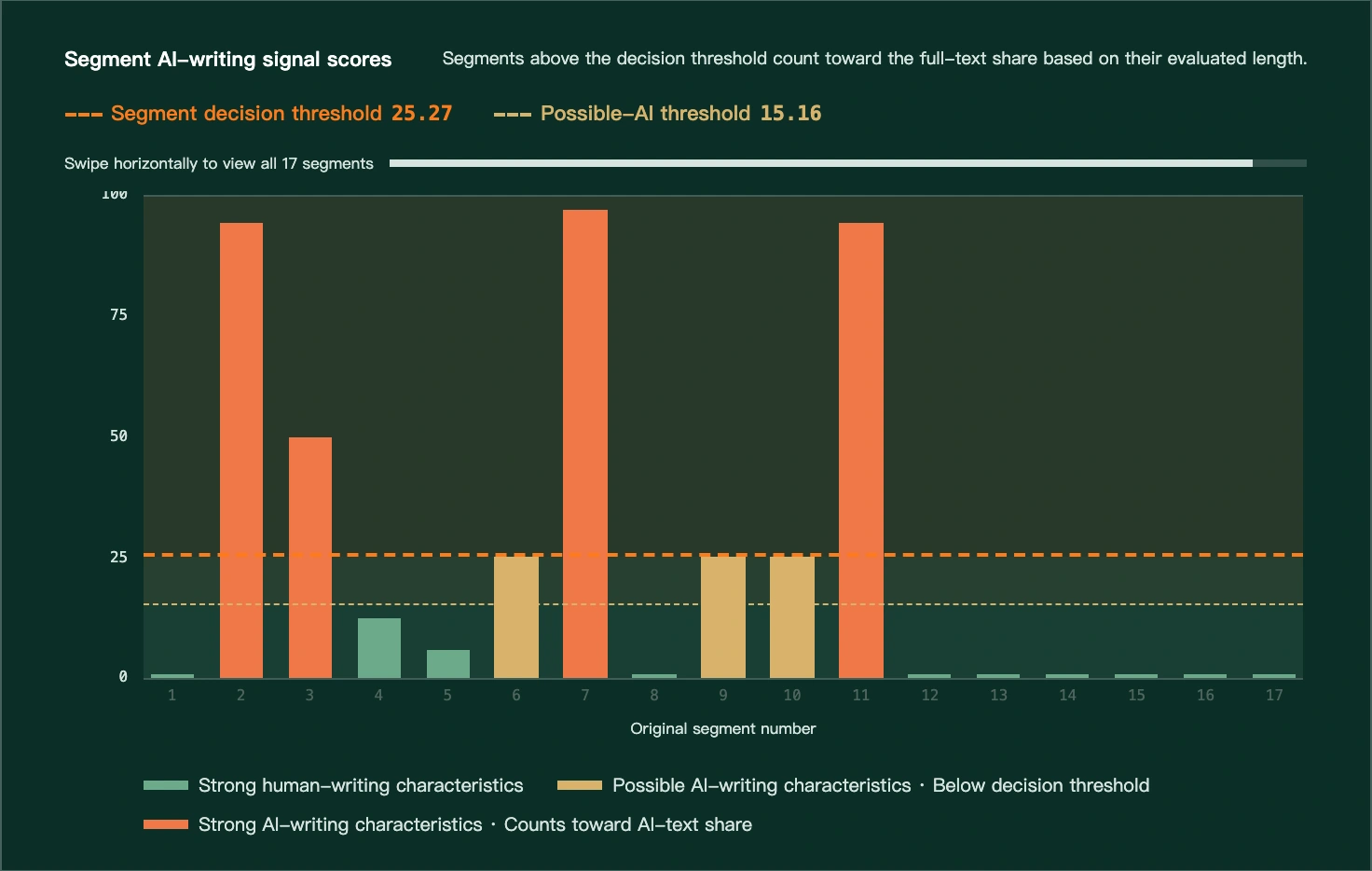
Swipe horizontally to review all 17 segment scores and the decision threshold.
Model test results
Detailed test results will appear after verification.
We are checking the current model's test record. If detailed results are temporarily unavailable, you can review the published results and methodology.
Review the methodology and limitationsTested model 20260820-011603: 2,800 texts, 2,759 were classified correctly, for an accuracy of 98.54%. These results apply only to this test set and do not guarantee an accurate finding for every text.
paperRR Detect · FAQ
Common questions about AI text analysis
Understand the results, their limits, and report verification.
01What does paperRR Detect analyze?
paperRR Detect compares your text with writing patterns learned by the model. The report helps you inspect textual evidence; it does not determine authorship, process, factual accuracy, or copyright.
02Can a result prove that AI generated the text?
No. A result supports review but does not prove authorship, misconduct, or copyright ownership. Consider drafts, revision history, sources, interviews, or an oral defense before reaching a conclusion.
03How do the AI-text share, overall average, and segment scores differ?
AI-text share measures evaluated text in segments above the decision threshold; possible-AI segments are excluded. The overall average weights segment scores by length. Segment scores locate passages for review. None is the probability that the author used AI.
04How should I interpret the five-part score breakdown?
The five contributions add up to the displayed score. They are not independent findings or authorship probabilities. Full-text contributions are weighted by evaluated length. Raw five-dimension effects in the technical notes use a different measure and cannot be added as points.
05Can AI text analysis be wrong?
Yes. Length, language, document type, rewriting, quotations, formatting, and differences from test data can affect results. paperRR publishes recognition rates and sample sizes by tested scenario; untested scenarios remain blank.
06Which languages, lengths, and document types are supported?
The site supports Chinese and English. Current submission and validated segment limits appear on the page. Your document type selects the matching criteria without changing your text.
07Which document type should I choose?
Choose Academic for papers and research; Literary for fiction, essays, and narratives; Long-form online for articles and blogs, not short posts or video scripts; and General when none fits.
08What is included in a paperRR explainable report?
The report pairs its findings with segment details, word-level evidence, form diagnostics, and integrity information so you can review the source text.
09Can I download a PDF report?
Yes. Download a watermarked PDF from the report page. New PDFs include a report ID and verification link. Web and PDF reports use the same findings and evidence; review the document type, integrity details, and use limits.
10How do I verify a report ID?
Copy the complete ID from the PDF or web report, then open the report verification page. Complete the CAPTCHA and compare the issuance summary with your report. IDs are case-sensitive, and legacy reports without one cannot be verified. Verification confirms the issued summary, not whether a file changed or the analysis is correct.
11Does report verification reveal my original text?
Verification does not provide the analyzed text, segment evidence, or full report. Anyone with the complete ID who passes the CAPTCHA can view the issuance date, original length, AI-text share, language, document type, and model version. The CAPTCHA prevents abuse; it does not confirm a relationship between the person searching and the report author. Before sharing a report or ID, make sure you are comfortable disclosing this summary. Issuance summaries are retained long term and currently have no automatic deletion policy. See Privacy.
12What should I do before submitting text?
Paste text or import .docx, .txt, or .md. Files are read locally; only extracted text is sent after you select Generate report. Word imports include body and table text, not images, headers, footers, footnotes, or comments. Review the import and remove sensitive or unauthorized content. See the paperRR Privacy.
13How can I confirm the metrics apply to the current model?
Check the tested model version, scope, and results by source, language, and document type. Metrics apply only to that model and scope; untested items remain blank.
Evidence you can inspect, with limits you can understand
Appropriate use
- 01
Before submittingChoose the right type and remove sensitive information
Submit complete, continuous text whenever possible. Choose Academic, Literary, Long-form online, or General as appropriate, and remove personal information, trade secrets, and third-party content you are not authorized to process.
- 02
When reviewingReview the finding, segments, and evidence in sequence
Use the overall finding to identify areas of concern, segment scores to narrow the review, and the score breakdown and word-level evidence to check the source text. No score is a probability of authorship.
- 03
When using the resultCombine it with human judgment and other evidence
Do not use a single report by itself to grade, discipline, suspend, demote, arbitrate, or make a public allegation. For consequential decisions, retain drafts, revision history, sources, and the review record.